

Have you ever found yourself staring at your Panasonic inverter microwave, frustrated because it’s locked and you can’t figure out how to unlock it? You’re not alone. Many people encounter this common issue, and it can be a real hassle when you’re in the middle of cooking or reheating your favorite meal.
Key Takeaways
- Unlocking Mechanisms: Familiarize yourself with common unlocking methods such as pressing the “Stop” button or performing a power reset to resolve lock issues quickly.
- Child Lock Awareness: Many Panasonic inverter microwaves feature a child lock for safety; reference your manual for the correct unlocking protocol if activated.
- Regular Maintenance: Regularly clean the microwave, inspect door seals and hinges, and ensure vents are unobstructed to prevent locking issues.
- Inspect Door Alignment: Ensure the door is properly closed and aligned, as misalignment can trigger or maintain the lock state.
- Understand Settings: Gain a clear understanding of the microwave’s power settings and functions to avoid common cooking problems and enhance performance.
Understanding Panasonic Inverter Microwaves
Panasonic inverter microwaves use a unique technology that delivers continuous cooking power. Unlike traditional microwaves, which cycle between high and low power, inverter models maintain a steady level of heat. This ensures even cooking, defrosting, and reheating, delivering better texture and flavor.
The primary function of the inverter is to optimize the heating process. By providing a consistent stream of microwaves, you can cook delicate foods like fish or sauces without overheating them.
Key Features
- Smart Inverter Technology: Allows precise temperature control, helping foods cook evenly.
- Turbo Defrost Function: Speeds up the defrosting process while preserving texture.
- Easy to Use: The control panel typically includes straightforward buttons for accessible operation.
Common Issues
- Locking Mechanism: Sometimes, users encounter difficulties unlocking the microwave. This can happen during or after cooking.
- Power Settings: Misunderstanding the inverter settings may lead to unevenly cooked meals.
- Read the Manual: Familiarize yourself with your microwave’s functions, control panel, and locking mechanism.
- Regular Maintenance: Keep the microwave clean and perform periodic checks for proper functioning.
- Perform Reset: If the microwave locks unexpectedly, doing a reset can often restore normal operation.
Understanding these aspects can help maximize your Panasonic inverter microwave’s potential and troubleshoot any concerns efficiently.
Common Reasons For Locking
Microwaves can lock for various reasons. Understanding these can help you resolve issues quickly.
Child Lock Feature
Many Panasonic inverter microwaves come equipped with a child lock feature. This safety measure prevents unintentional operation by children. If activated, you’ll notice that buttons may become unresponsive. To check if the child lock is on, consult your user manual for specific key combinations to unlock it.
Safety Precautions
Microwave locking can also happen for safety reasons. For instance, if the door isn’t closed properly, the appliance may lock itself to prevent misuse. Ensure the door latch engages fully when closed. If there’s an issue with the door sensor, this might lead to a locking mechanism activation. Regularly inspect the door and hinges for debris or obstructions to maintain functionality.
Step-by-Step Guide To Unlock
Unlocking your Panasonic inverter microwave can be straightforward with the right steps. Follow these methods to regain access to your appliance.

Even Cooking with Inverter Technology: Delivers consistent power for evenly cooked meals, helping prevent overcooked edges and cold centers when reheating, defrosting, or cooking.

Delicious Food, Smarter Cooking with Panasonic Microwaves: Panasonic patented Cyclonic Wave Inverter technology evenly circulates heat in 3D waves for more even, efficient cooking with delicious results
Using the Control Panel
- Check the Display: Look for any indicators such as a locked symbol on the display.
- Press and Hold the “Stop” Button: Press and hold the “Stop” button for approximately 3 to 5 seconds. This often clears any settings, including the lock.
- Press the “Start” Button: If the microwave remains locked, try pressing the “Start” button after the “Stop” button. This can disengage the locking mechanism.
It’s essential to refer to your specific model’s manual if these actions don’t work, as controls can vary slightly between models.
- Unplug the Microwave: Disconnect the power cord from the wall outlet, wait for about 60 seconds, and then plug it back in. This resets most systems, including the lock.
- Child Lock Feature: If the child lock is activated, consult the manual for the precise unlocking method. Usually, it involves pressing a combination of buttons.
- Check for Mechanical Issues: Inspect the door for debris or misalignment. Sometimes, obstacles can prevent the door from closing fully, triggering a lock state.
Keep these methods handy for quick access when the locking issue arises.
Troubleshooting Tips
Troubleshooting a locking issue in your Panasonic inverter microwave can be straightforward when you know where to start. Here are some effective tips to help you resolve the situation.
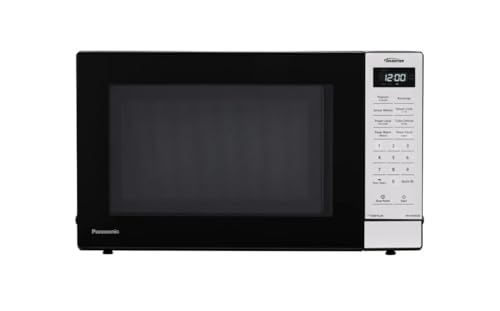
Cook faster & more evenly with Inverter Technology for consistent heating from edges to center
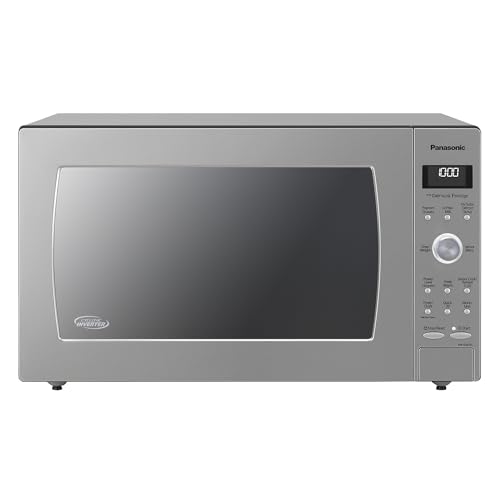
Delicious Food, Smarter Cooking with Panasonic Microwaves: Cyclonic Inverter Technology evenly circulates heat in 3D waves for more even, efficient cooking with delicious results
If Unlocking Fails
- Check the Display: Look for any lock symbols on the display. If a lock indicator shows, the child lock is likely activated.
- Press and Hold: Hold the “Stop” button for about three seconds to deactivate the lock. Listen for a beep or see if the display changes.
- Unplug the Microwave: Disconnect the microwave from the power source for about five minutes. Replug and check if the lock is gone.
- Inspect Door Alignment: Make sure the door closes properly. Misalignment can trigger the locking mechanism.
- Refer to the Manual: Consult your specific model’s manual for any unique unlocking methods. Each model may have distinct functions.
- Regular Cleaning: Clean around the door and hinges frequently. Food particles can cause the door not to close properly, affecting the lock mechanism.
- Inspect Seals and Hinges: Check the door seals and hinges for wear and tear. Damaged parts can lead to locking issues.
- Keep Vents Clear: Ensure ventilation areas are unobstructed. Adequate airflow prevents heating problems that may trigger safety locks.
- Avoid Overloading: Don’t overload the microwave with heavy items. Excess weight can misalign the door or hinder its function.
- Perform Periodic Resets: Occasionally unplug the appliance for a reset. This practice helps maintain optimal performance.
These tips can help ensure that your Panasonic inverter microwave operates smoothly and efficiently, even if you encounter issues with the locking mechanism.
Conclusion
Unlocking your Panasonic inverter microwave doesn’t have to be a hassle. By following the steps outlined in this article and keeping your appliance well-maintained, you can enjoy all the benefits of this innovative cooking technology. Remember to check for lock indicators and consult your manual for specific instructions tailored to your model.
With a little patience and care, you can troubleshoot any locking issues and get back to cooking your favorite meals in no time. So go ahead and make the most of your microwave’s features, ensuring delicious results every time. Happy cooking!
Frequently Asked Questions
What causes the locking mechanism to activate on my Panasonic inverter microwave?
The locking mechanism may activate due to the child lock feature, which prevents accidental use. Additionally, debris around the door or hinges can lead to the lock being engaged. Ensure the microwave door is fully closed and clear of obstructions.
How do I unlock my Panasonic inverter microwave?
To unlock, check for lock symbols on the display. Try pressing and holding the “Stop” button or unplugging the microwave for a reset. Always consult your specific model’s manual for exact unlocking instructions.
What is unique about Panasonic inverter microwave technology?
Panasonic inverter microwaves utilize smart inverter technology, providing continuous cooking power for even heating, defrosting, and reheating. This allows precise temperature control and efficient cooking compared to traditional microwaves.
How can I maintain my Panasonic inverter microwave?
Regular maintenance includes cleaning around the door and hinges, checking seals for wear, keeping vents clear, and avoiding overloading. Familiarize yourself with the manual and perform periodic resets for optimal performance.
What should I do if my microwave buttons are unresponsive?
This may indicate that the child lock is activated or there’s a malfunction. Consult the manual for unlocking instructions and ensure the door is properly closed. If issues persist, consider inspecting for mechanical problems.
